# What is BMB?
Bernard Magee Bridge (BMB) – bernardmageebridge.com – was launched just after lockdown and has quickly become the UK's premier online bridge learning community.
{% hint style="info" %}
**BMB caters to bridge players ranging from novices to club experts.**
**Every week Bernard Magee releases fresh bite-sized content to inspire and challenge your bridge playing abilities. Take as much or as little as your time allows.**
{% endhint %}
{% hint style="success" %}
**Good to know:** Bernard Magee Bridge is a subscription membership site where members receive monthly seminars, hands, quizzes and community from Bernard Magee, the UK's foremost bridge tutor.
{% endhint %}
## ABOUT YOUR TUTOR - BERNARD MAGEE
Bernard Magee - the UK's #1 bridge tutor
Bernard Magee is the UK’s best-known bridge teacher and host, and has built up a tremendous following from his regular and highly popular articles in BRIDGE magazine.
He is the author of best-selling interactive tutorial software and DVDs on Acol Bridge available from the Bernard Magee Bridge shop and Amazon. Bernard has published numerous bridge books, including Quiz books and Tips books. He also has a range of e-books (available on Amazon) on bidding quizzes designed especially for tablet / iPad reading with a quiz on one page and the answer on the next.
## WHAT DO I RECEIVE AS A BMB MEMBER?
When you become a member of Bernard Magee Bridge (BMB) you will receive more than simple online bridge tutorials. Being a BMB member means joining a community of likeminded bridge enthusiasts with whom you can chat and play on or offline.
**Overview of membership access:**
1. **Fully Online**\
Available 24/7 Whether you're a night owl or an early bird, your BMB membership will keep you company whatever the time.
2. **Membership Content Updated Weekly**\
Bernard updates content weekly to ensure there is always something new to learn and enjoy for members. He does THREE live shows each week with the opportunity for viewers to interact with each other and Bernard on the live chat.
3. **Seminars, quizzes, hands - and more\***\
Whether you like playing set hands or testing your wit against Bernard's cunning quizzes, there are hours of entertainment at your fingertips.
4. **Forums and Private Facebook Group**\
Feel free to branch out, meet new people and make new friends via our BMB community forums as well as our highly active Members' Facebook Group.
**\*As a member of Bernard Magee Bridge you will receive access to unprecedented quality training, all designed and presented by Bernard himself.**
## BMB MEMBERSHIP WEBSITE SUMMARY
{% hint style="info" %}
**At the end of 2022 we released a major update to the BMB website.**
{% endhint %}
> ### **Members: You can now easily dip in and out of the site when it suits you.**
>
> You no longer need to feel that you have to keep up, as all the new content is added to our easy to search archive. So, for example if you love the Quizzes, then you can go to the Quizzes Archive and choose the type you like - Bidding, Lead (Prize), Play or Novice Bidding - and watch as many or as few as you desire.
>
> ### **We have redesigned the entire website, so searching and navigation around the site will be easier and quicker for you.**
>
> We continue to give you lots of NEW weekly video content, THREE weekly live shows, set hand practice and games, and our community continues to thrive and is now found under the 'Bridge Chat' section.
>
> We now also have an extensive library of bridge resources with a great search facility.
>
> ### **Points are now awarded for the Lead (Prize) Quiz and furthermore we have introduced new BMB Courses, found under the Tuition menu, with 11 topics to start.**
>
> We are evolving the Novice Members section, which (for Novice Members) features on your 'My Homepage'.
>
> ### Keep an eye on 'BMB Updates' in the menu
>
> Here you will find the latest news and calendar of online live shows and games as well as Bernard's blog (coming soon) .
>
> ### Send us your feedback!
>
> The new website offers us much more flexibility in what we can implement, so your continued feedback is very much appreciated, and we really value it all in order to grow things further for you. To give us feedback, please go to 'Bridge Chat' in the main menu bar, select 'New BMB Forums!' and then you will see the 'Website Suggestions' forum at the bottom of the list.
>
> Alternatively email us: ****
>
> Our team are here to help you, so if you have any questions at all please either email us or call us on **01344 205 120**.
>
> **P.S.** Please remember to email us your example hands – Bernard really likes to have hands from real games to demonstrate his ideas in the live shows!
>
> ## BMB MEMBERSHIP - ALL INCLUDED:
>
> ###
>
> ### Monthly Big Seminar
>
> Bernard's monthly Big Seminars cover a different bridge topic each month and sets the subject for the month, which is continued in the Monday Live Show on YouTube.
>
> LIN and PBN files relating to each seminar are available for download on the BMB seminar page. The first two weeks of the month feature set hands relating to the Big Seminar and the second two weeks each have Mixed Set Hands to test your knowledge.
> ### Weekly Live Events
>
> Bernard's Live Events are broadcast on Mondays (open seminar), Wednesdays (Teams on BBO - members only) and Fridays (members only seminar). Please see calendar for all our dates and times. Click the link for the [BMB Live Events Calendar](https://bernardmageebridge.com/bmb-events/)
> ### Weekly Quizzes
>
> Bernard creates weekly quizzes to test your knowledge and help you improve. There are four new quizzes each week: Novice Bidding Quiz, Bidding Quiz, Play Quiz and Lead Quiz.
> ### Hands of the Week
>
> The Hands of the Week are taken from the Q-Plus software available in the [BMB Shop](https://bernardmageebridge.com/shop/). Each week there is an Easier Hand of the Week and a Harder Hand of the Week.
> ### Community Forums
>
> Members have access to our vibrant and engaging community forums. We have four Member's Forums:
>
> 1. General Discussion Forum
> 2. Partnership Forum
> 3. Bridge Questions Forum
> 4. Laws & Ethics Forum
> ### Private Facebook Group
>
> BMB Members also are invited to join the BMB Private Facebook Group to engage in general discussion, find a partner and learn about exclusive Member's events.
{% hint style="success" %}
**Good to know:** BMB membership is a monthly membership which can be cancelled at any time. We do not lock you in to extended membership periods.
{% endhint %}
## Big Seminar Taster
Here's a taster of one of Bernard's Big Seminars:
{% embed url="" %}
## Bidding Quiz Taster
Here's a taster of one of Bernard's quizzes:
{% embed url="" %}
## Guides: become a BMB expert in no time!
Follow our handy guides to get started on the basics of getting the most out of Bernard Magee Bridge.
{% hint style="success" %}
**Good to know:** we update these guides regularly so if there is anything that is unclear or hard to find, we hope you will the answer here. If not, you can always [**Contact Us**](mailto:support@bernardmageebridge.com) and we will respond to your question as quickly as possible.
{% endhint %}
# BMB Content Overview
Since its inception in 2020, bernardmageebridge.com has grown to become an incredible Bridge resource. Guided learning has never been easier. There's something for every experience and interest level.
### How would your bridge improve with access to all this, with new content added every week?
**Full members** have **online access** to **all content** whilst they are **subscribed** to **BMB**.
### 40 Big Seminars
Bernard has created over **30 Big Seminars** which take a **deep dive** into many **important** **bridge topics**. These are **accompanied** by **over 300 Set Hands**, set on the **various topics**.
### 250 Mini Seminars
The **weekly Monday** and **Friday** live show **mini seminars** provide **quick and easy** regular **learning** on all **important topics**.
### 120 Teams Events
**Bernard** has played **over 120 teams events** live. **BMB members** have **access** to the **entire library** to **watch at your leisure**.
### 300 Quizzes
**Challenge yourself** and **improve your skills** with **Bernard's Bidding**, **Play** and **Lead quizzes**. You could even get on the **BMB leaderboard!** **New quizzes** are released **weekly**.
### 250 Hands
A **huge variety** of **hands to play**, all **chosen and directed** by Bernard to **support** the **topics** **covered** within the **seminars**. A new **Easier** and **Harder Hand** are released **weekly**.
### 11 Courses
**Bernard's own** courses **created specially** for **BMB members**. Take **some**, or **none**, the **choice is yours**. Bernard **collects a variety of content** together **under the same topic** – allowing you to **focus** on **one subject**.
### Online Games
**Weekly online games** and **Set Hand practise sessions** are arranged for **BMB members only**. Managed by **BMB approved directors**. A small **friendly** online game is available **once a week**.
### Community Forums
Join the **conversation** in one of four **BMB community forums** – including **‘Bridge Questions – Ask Julian Pottage’** and **‘Laws & Ethics – Ask David Stevenson ’**. **Members** also receive **access** to the **BMB Private Facebook Group**.
### One Incredible Bridge Resource
**Guided bridge learning** has never been **easier!** There's **something for every experience** and **interest level** at **BMB**.
# Getting Started on BMB
## How to Start Your Journey Around BMB
We have **three ways** to learn about **BMB** and to help you **navigate** around the **BMB website**:
1. **Interactive Tour**
2. **Website Introduction Video**
3. **Written guide to the menu bar and content**
### **Interactive Tour**
When you first **login** and arrive on your **BMB ‘My Homepage’**, there is an **Interactive Tour** (*press the yellow **'Start Tour'** button if this does not play automatically*).
The yellow 'Start Tour' button starts the Interactive Tour
### Website Introduction Video
We have also created a **Website Introduction Video**. This is **especially helpful** if you find the **Interactive Tour** difficult to follow.
{% embed url="" %}
### Written Guide to the Menu Bar and Content
Below is a **written guide** to the **menu bar** (*the menu bar is found at the top of the BMB website*). This written guide follows the menu bar from **left to right**, guiding you through the **content** you will find under **each heading**.
The **headings** are as follows:
\_\_\_\_\_\_\_\_\_\_\_\_\_\_\_\_\_\_\_\_\_\_\_\_\_\_\_\_\_\_\_\_\_\_\_\_\_\_\_\_\_\_\_\_\_\_\_\_\_\_\_\_\_\_\_\_\_\_\_\_\_\_\_\_\_\_\_\_\_\_\_\_\_\_\_\_\_\_\_\_\_\_\_\_\_\_\_\_\_\_\_\_\_\_\_\_\_\_\_\_\_\_\_
## My Homepage
**'My Homepage'** gives you a summary of **your account** and all **your activity**.
* Under the box saying **‘Welcome to your Homepage’**, there is a **‘Quick Access’** box.
* Click **'Bridge Content'** (in the **'Quick Access'** box).
* **Or** scroll down the page and you will see the **‘Bridge Content - New & Archive'** box.
\_\_\_\_\_\_\_\_\_\_\_\_\_\_\_\_\_\_\_\_\_\_\_\_\_\_\_\_\_\_\_\_\_\_\_\_\_\_\_\_\_\_\_\_\_\_\_\_\_\_\_\_\_\_\_\_\_\_\_\_\_\_\_\_\_\_\_\_\_\_\_\_\_\_\_\_\_\_\_\_\_\_\_\_\_\_\_\_\_\_\_\_\_\_\_\_\_\_\_\_\_\_\_
## Bridge Content
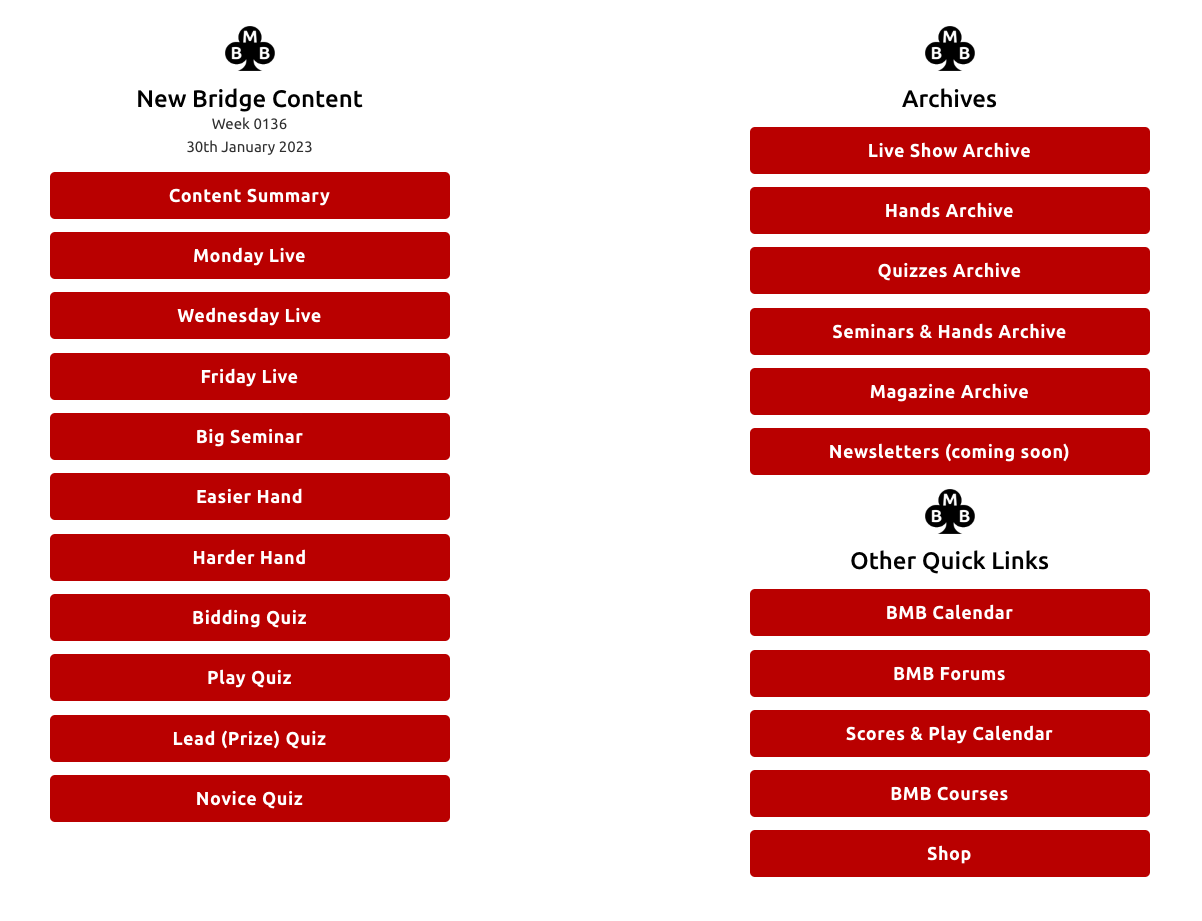
**‘Bridge Content’** brings up a **menu page** with **red buttons** for **quick links** to all the **new and archive** bridge **content** as well as **quick links** to access **other areas** on the site:
\_\_\_\_\_\_\_\_\_\_\_\_\_\_\_\_\_\_\_\_\_\_\_\_\_\_\_\_\_\_\_\_\_\_\_\_\_\_\_\_\_\_\_\_\_\_\_\_\_\_\_\_\_\_\_\_\_\_\_\_\_\_\_\_\_\_\_\_\_\_\_\_\_\_\_\_\_\_\_\_\_\_\_\_\_\_\_\_\_\_\_\_\_\_\_\_\_\_\_\_\_\_\_
## BMB Updates
See our latest **Weekly Newsletter** (*coming soon*).\
\
**Check** the [**BMB Calendar**](https://bernardmageebridge.com/bmb-events/) for the **date** and **time** of:
* **Live Shows**
* **Set Hand Practice Sessions** on **BBO**
* **Bridge games** on **BBO**
* **Casual Bridge** Games
* **Novice Sessions** on **BBO**
* Follow **Bernard's Blog** (*coming soon*)
\_\_\_\_\_\_\_\_\_\_\_\_\_\_\_\_\_\_\_\_\_\_\_\_\_\_\_\_\_\_\_\_\_\_\_\_\_\_\_\_\_\_\_\_\_\_\_\_\_\_\_\_\_\_\_\_\_\_\_\_\_\_\_\_\_\_\_\_\_\_\_\_\_\_\_\_\_\_\_\_\_\_\_\_\_\_\_\_\_\_\_\_\_\_\_\_\_\_\_\_\_\_\_
## Tuition
**Self-guided learning:**
* **BMB Courses**
* **Begin Bridge** - software for beginners
* **Bridge Glossary**
* **BRIDGE Magazine**
* **Charity Bridge Video Archive**
* **Novice Tips**
\_\_\_\_\_\_\_\_\_\_\_\_\_\_\_\_\_\_\_\_\_\_\_\_\_\_\_\_\_\_\_\_\_\_\_\_\_\_\_\_\_\_\_\_\_\_\_\_\_\_\_\_\_\_\_\_\_\_\_\_\_\_\_\_\_\_\_\_\_\_\_\_\_\_\_\_\_\_\_\_\_\_\_\_\_\_\_\_\_\_\_\_\_\_\_\_\_\_\_\_\_\_\_
## Practice & Play
* **BMB Games Overview**
* **Set Hand Games** on **BBO**
* **Games** on **BBO**
* **Casual Games** on **BBO**
* **Novice Session** on **BBO**
* **BMB Scores & Play Calendar** (BridgeWebs)
* **IntoBridge** - how to **sign up** (*BMB will be transitioning bridge play to IntoBridge*)
For the **full schedule** of **games on BBO,** **Set Hand games on BBO** and **Casual Bridge games,** see the [**BMB Calendar**](https://bernardmageebridge.com/bmb-events/).
\_\_\_\_\_\_\_\_\_\_\_\_\_\_\_\_\_\_\_\_\_\_\_\_\_\_\_\_\_\_\_\_\_\_\_\_\_\_\_\_\_\_\_\_\_\_\_\_\_\_\_\_\_\_\_\_\_\_\_\_\_\_\_\_\_\_\_\_\_\_\_\_\_\_\_\_\_\_\_\_\_\_\_\_\_\_\_\_\_\_\_\_\_\_\_\_\_\_\_\_\_\_\_
## Shop
**We have a range of digital bridge offerings in our shop:**
* **Special Offers**
* **Live Shows** (included in full BMB membership)
* **Membership & Subscriptions**
* **Bridge DVDs**
* **Modules** (*included in full BMB membership*)
* **Gift Vouchers**
* **Bernard's E-books** (*on Amazon*) - designed for **iPad**
* **Bridge Software**
\_\_\_\_\_\_\_\_\_\_\_\_\_\_\_\_\_\_\_\_\_\_\_\_\_\_\_\_\_\_\_\_\_\_\_\_\_\_\_\_\_\_\_\_\_\_\_\_\_\_\_\_\_\_\_\_\_\_\_\_\_\_\_\_\_\_\_\_\_\_\_\_\_\_\_\_\_\_\_\_\_\_\_\_\_\_\_\_\_\_\_\_\_\_\_\_\_\_\_\_\_\_\_
## Bridge Chat
**Catch up** with our friendly **BMB bridge community:**
**New BMB Forums!**
* **General Discussions**
* **Bridge Questions - Ask Julian Pottage**
* **Laws & Ethics - Ask David Stevenson**
* **Looking to Play Online**
* **BMB Novices**
* **Website Suggestions**
**BMB Forums Archive** - forums migrated from the **old website** (*no further comments possible on the Forums Archive – use for reference only*).
**Facebook Group** (members private group) – the **Facebook Group** can be found [**here**](https://www.facebook.com/groups/bernardmageebridgemembersclub).
\_\_\_\_\_\_\_\_\_\_\_\_\_\_\_\_\_\_\_\_\_\_\_\_\_\_\_\_\_\_\_\_\_\_\_\_\_\_\_\_\_\_\_\_\_\_\_\_\_\_\_\_\_\_\_\_\_\_\_\_\_\_\_\_\_\_\_\_\_\_\_\_\_\_\_\_\_\_\_\_\_\_\_\_\_\_\_\_\_\_\_\_\_\_\_\_\_\_\_\_\_\_\_
## BMB Bridge Holidays
Find out **more** about all our **BMB Bridge Holidays** open to **ALL**:
* **UK**
* **Overseas**
* **Cruises**
All on our [**bmbholidays.com**](https://bmbholidays.com) website.
# Computer vs Tablet Menus
## The Main Menu on Computers and Tablets
The **BMB Main Menu** is how you navigate **Bernard Magee Bridge**. The menu will **always** be visible at the **top** of each page on **BMB**.
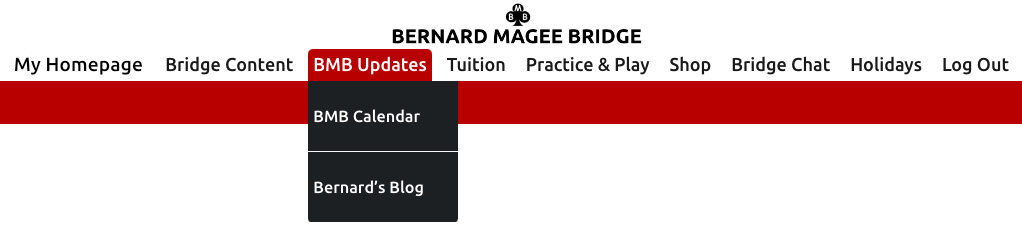
The menu will **look different** depending on **which device** you are using. If you are using a **computer** then you will see a menu like **this**:
### Computer Main Menu
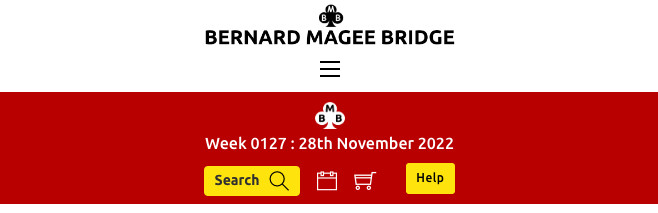
whereas if you are using a **smaller screen**, such as on **a tablet** such as an **iPad**, then **menu** will look like **this**:
### iPad or Tablet Main Menu
Both the **computer menu** and the **tablet menu** have the **same navigation links** and do the **same job**. They are just **arranged differently** to account for the fact that a computer screen has **more space** to play with, whereas screen **space** on a **tablet is limited**.
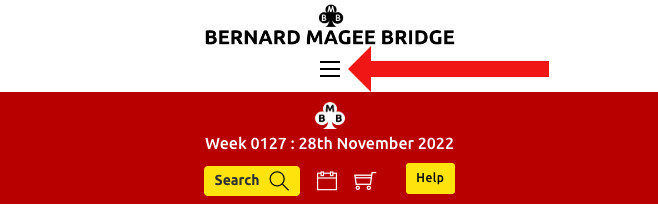
On the **tablet menu** click the **three lines** indicated below to **expand** the **menu** options.
# Bridge Content Explained
{% hint style="success" %}
**Good to know:** new BMB Members' content is released every Monday before 9am.
{% endhint %}
## How do I find the Bridge Content?
You can navigate to the Bridge Content two ways:
1. **When you log-in to BMB you are taken automatically to your 'My Homepage'.** Click **'Bridge Content'** (in the 'Quick Access' box) or scroll down the page and you will see the ‘Bridge Content - New & Archive box’ where you can quickly access all the new and archive Bridge content on the site.
2. On the Menu bar you will see **‘Bridge Content’** – clicking this brings up a menu page with quick access to all the new and archive Bridge content as well as quick links to access other areas on the site.
\_\_\_\_\_\_\_\_\_\_\_\_\_\_\_\_\_\_\_\_\_\_\_\_\_\_\_\_\_\_\_\_\_\_\_\_\_\_\_\_\_\_\_\_\_\_\_\_\_\_\_\_\_\_\_\_\_\_\_\_\_\_\_\_\_\_\_\_\_\_\_\_\_\_\_\_\_\_\_\_\_\_\_\_\_\_\_\_\_\_\_\_\_\_\_\_\_\_\_\_\_\_\_
## What bridge content is there on BMB?
## Live Shows
There are three live shows every week (apart from when Bernard is on holiday having a well-earned rest!). The three live shows are:
* **Monday Live Show** - a free mini-seminar available to both Members and Non-Members.
* **Teams on BBO** - a Members-only show where Bernard plays live online with commentary.
* **Friday Live Show** - a Members-only mini-seminar on a different topic to the Big Seminar.
## Quizzes and Hands of the Week
* **Easier Hand of the Week** - an easier hand to get you thinking.
* **Harder Hand of the Week** - a harder hand to challenge your knowledge.
* **Novice Bidding Quiz** - a bidding quiz designed for those new to bridge.
* **Bidding Quiz** - a bidding quiz for those who have been playing longer.
* **Play Quiz** - decide on your play from an example board.
* **Lead Quiz** - "what card do you lead?"
## Seminars and Set Hands
* **Bernard's Monthly Big Seminar** - the long seminar that introduces the topic of the month.
* **Mixed Set Hands** - set hands designed for revision of the topics covered in BMB.
\_\_\_\_\_\_\_\_\_\_\_\_\_\_\_\_\_\_\_\_\_\_\_\_\_\_\_\_\_\_\_\_\_\_\_\_\_\_\_\_\_\_\_\_\_\_\_\_\_\_\_\_\_\_\_\_\_\_\_\_\_\_\_\_\_\_\_\_\_\_\_\_\_\_\_\_\_\_\_\_\_\_\_\_\_\_\_\_\_\_\_\_\_\_\_\_\_\_\_\_\_\_\_
## Let's look at each of these in more detail...
## Released Monthly
### Big Seminar’ with x8 accompanying Set Hands
Every month – Bernard releases a new **‘Big Seminar’** with **x8** accompanying **Set Hands**.\
This is the topic of the month, and stemming from the ‘Big Seminar’ Bernard discusses the topic in each Monday Live throughout the month.\
\
There are four options to play or review these Set Hands (**note:** please see the **‘Practice and Play Overview – Playing options’** for full info on these options).
### Mixed Set Hands
Available for the **last one or two weeks** of each month – see the [**BMB Calendar**](https://bernardmageebridge.com/bmb-events/) for the **online playing schedule.**
## Released Weekly
### Weekly Live Shows
**Each week Bernard presents 3 live shows – they can be watched live or later at your leisure:**
**11.00am Monday LIVE** (FREE to **ALL** – members & non-members)\
This is based on the topic of the month, extending from the monthly ‘Big Seminar’
**7:30pm Wednesday Teams LIVE** (**members only**)\
Bernard's live Teams shows. Watch Bernard play **live** (or later at your leisure) while he talks through his play. There is an optional **live chat** interaction with fellow viewers and Bernard.
Once a month there is a **Prize Teams** game – winners of the weekly **Lead (Prize) Quiz** play alongside Bernard.
There is sometimes a **Pairs Game** (pre-recorded), in which Bernard will have played in the previous **Monday** BMB evening game alongside fellow BMB members.
**11.00am Friday LIVE** (**members only**)\
This live show includes a **Mini Seminar** that covers a different topic from the **monthly topic** and is often covered over **several weeks**. Delving **more deeply** into subjects.
### Hands of the Week
**Easier Hand (of the week)**\
Easier hands for you to try. Bernard talks through the bidding and play of an easier hand on the **Q-Plus** software.
**Harder Hand (of the week)**\
Harder hands for you to try. Bernard talks through the bidding and play of an harder hand on the **Q-Plus** software.
### BMB Quizzes
**Bidding Quiz**\
Question and Answer presented on video.
**Play Quiz**\
A still image with a written question is followed by Bernard’s video answer.
**Lead (Prize) Quiz**
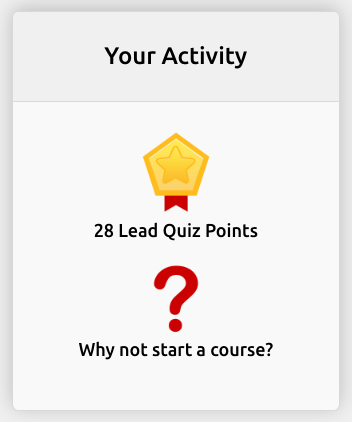
The BMB weekly **Lead Quiz**. Also known as the **Prize Quiz**. Try this quiz to see how you score out of 10. Your **Lead Quiz Points** will show in **'Your Activity'** above. If you score **10/10** then you have the opportunity to enter into the **Lead Quiz Prize Draw** to play in the **Prize Teams Game** alongside Bernard.
**Novice Quiz**\
Question and Answer presented on video.
## Archive
Access to all the monthly and weekly content above in our archives.
## Tuition
* BMB Courses
* Begin Bridge
* Bridge Glossary
* BRIDGE Magazine
* Charity Videos
## Bridge Chat
### **New BMB Forums!**
* General Discussions
* Bridge Questions – Ask Julian Pottage
* Laws & Ethics – Ask David Stevenson
* Looking to Play Online
* BMB Novices
* Website Suggestions
* BMB Forums Archive – forums migrated from the old website (no further comments possible – use for reference only).
* Facebook Group (members private group) – click link to take you to the [**Facebook page**](https://www.facebook.com/groups/bernardmageebridgemembersclub).
# Practice and Play
# Playing Options
## Playing Options
{% hint style="warning" %}
From Monday **6th February**, the **MONDAY** game is moving to **IntoBridge**. You will need to **register** on IntoBridge **ahead of the game**. [**Click here for instructions**](/site-guides/practice-and-play/playing-options/intobridge-how-to).
{% endhint %}
## BMB Members Only Game on BBO
There is an opportunity to play in a **BMB Members Only** game on **Monday at 7.30pm** (currently on BBO – Bridge Base Online) – see the [**BMB Calendar**](https://bernardmageebridge.com/bmb-events/).
**NOTE:**
* Only **BMB Members** are able to join in this game
* In order to participate we will need your **BBO Username** to be registered with **BMB** – you can add this to your account on your **‘My Homepage’** at the bottom in the **‘Account Admin’** section.
* **BBO** will charge you for playing in this session directly\*
## Casual Bridge Game for BMB Members Only
We have set up some informal, **casual games** on **BBO**.
This is meant as nothing more than a **suggestion of time for players to get together**, so that you feel you are playing **amongst friends**.
In theory you can turn up at **any time** as there may be space to play on **vacated tables**. As it is **very informal**, you can play for as long or short as you want, but please **be polite** and help everybody to **enjoy the game**.
**NOTE:**
To see the full info and **game times** please see our **‘Practice and Play’** section on the members **Menu bar** (you will need to **log-in** to see this).
## Novice Session on BBO
This takes place at **10am on Saturdays** and **BMB Helpers** will be available to **teach** and **guide** you.
**NOTE:**
To see the full info please go to our **‘Practice and Play’** section on the members **Menu bar** (you will need to **log-in** to see this).
{% hint style="warning" %}
***\*Please note that the fee you pay BBO covers the BBO cost and director fees.***
{% endhint %}
# IntoBridge How To
IntoBridge is an exciting new way to play bridge online. We’ve been conducting some test games behind the scenes and we really like it. So, we are now expanding the service to all full BMB members!
Joining an **IntoBridge** game is **super-easy**, just **follow the steps** below.
When **registering** with **IntoBridge**, we suggest you **use your BBO Name** as your **Username**. This is **highlighted in yellow** in **Step 2**.
\_\_\_\_\_\_\_\_\_\_\_\_\_\_\_\_\_\_\_\_\_\_\_\_\_\_\_\_\_\_\_\_\_\_\_\_\_\_\_\_\_\_\_\_\_\_\_\_\_\_\_\_\_\_\_\_\_\_\_\_\_\_\_\_\_\_\_\_\_\_\_\_\_\_\_\_\_\_\_\_\_\_\_\_\_\_\_\_\_\_\_\_\_\_\_\_\_\_\_\_\_\_\_
## STEP 1
### Go to the IntoBridge website
[**Click here**](https://intobridge.com/) to open the **IntoBridge** website in a new browser tab and click on either of the **Play Now** buttons.
\_\_\_\_\_\_\_\_\_\_\_\_\_\_\_\_\_\_\_\_\_\_\_\_\_\_\_\_\_\_\_\_\_\_\_\_\_\_\_\_\_\_\_\_\_\_\_\_\_\_\_\_\_\_\_\_\_\_\_\_\_\_\_\_\_\_\_\_\_\_\_\_\_\_\_\_\_\_\_\_\_\_\_\_\_\_\_\_\_\_\_\_\_\_\_\_\_\_\_\_\_\_\_
## STEP 2
### Register or Login
On your **first visit** you will need to register for **IntoBridge access**.
**IMPORTANT NOTE FOR BMB MEMBERS:** We suggest you use your **BBO Name** as your **Username** *(**highlighted in yellow below**)* for **IntoBridge**.
Once you have clicked **Register**, look out for an **email** which will ask you to **confirm your registered email address**.
\_\_\_\_\_\_\_\_\_\_\_\_\_\_\_\_\_\_\_\_\_\_\_\_\_\_\_\_\_\_\_\_\_\_\_\_\_\_\_\_\_\_\_\_\_\_\_\_\_\_\_\_\_\_\_\_\_\_\_\_\_\_\_\_\_\_\_\_\_\_\_\_\_\_\_\_\_\_\_\_\_\_\_\_\_\_\_\_\_\_\_\_\_\_\_\_\_\_\_\_\_\_\_
## STEP 3
### Finding Games
On your **first visit** you will need to register for **IntoBridge access**.
IMPORTANT NOTE FOR BMB MEMBERS: You can search for BMB games. The game is called **BMB Duplicate** and the organiser is **BMBhost**.
\_\_\_\_\_\_\_\_\_\_\_\_\_\_\_\_\_\_\_\_\_\_\_\_\_\_\_\_\_\_\_\_\_\_\_\_\_\_\_\_\_\_\_\_\_\_\_\_\_\_\_\_\_\_\_\_\_\_\_\_\_\_\_\_\_\_\_\_\_\_\_\_\_\_\_\_\_\_\_\_\_\_\_\_\_\_\_\_\_\_\_\_\_\_\_\_\_\_\_\_\_\_\_
## STEP 4
### Register for the game with, or without, a partner
On your **first visit** you will need to register for **IntoBridge access**.
If you **DO HAVE** a partner: Start typing their username and select it from the list. Then click the button to **Invite**.
If you **DO NOT** have a partner: Go to the **Partnership Desk**.
\_\_\_\_\_\_\_\_\_\_\_\_\_\_\_\_\_\_\_\_\_\_\_\_\_\_\_\_\_\_\_\_\_\_\_\_\_\_\_\_\_\_\_\_\_\_\_\_\_\_\_\_\_\_\_\_\_\_\_\_\_\_\_\_\_\_\_\_\_\_\_\_\_\_\_\_\_\_\_\_\_\_\_\_\_\_\_\_\_\_\_\_\_\_\_\_\_\_\_\_\_\_\_
## STEP 5
### Play Bridge!
Once your **registration is confirmed**, simply wait **until the game starts**.\
\
The **director** starts the game **manually** so **don't worry** if nothing happens when the countdown clock runs out and you see the message ***"About to start"*** on screen. This simply means the director has not yet started the game.
\_\_\_\_\_\_\_\_\_\_\_\_\_\_\_\_\_\_\_\_\_\_\_\_\_\_\_\_\_\_\_\_\_\_\_\_\_\_\_\_\_\_\_\_\_\_\_\_\_\_\_\_\_\_\_\_\_\_\_\_\_\_\_\_\_\_\_\_\_\_\_\_\_\_\_\_\_\_\_\_\_\_\_\_\_\_\_\_\_\_\_\_\_\_\_\_\_\_\_\_\_\_\_
## TO GET HELP
Need **help** when you have **logged in?** Click on the **BMBHost** icon as **shown below**.
\_\_\_\_\_\_\_\_\_\_\_\_\_\_\_\_\_\_\_\_\_\_\_\_\_\_\_\_\_\_\_\_\_\_\_\_\_\_\_\_\_\_\_\_\_\_\_\_\_\_\_\_\_\_\_\_\_\_\_\_\_\_\_\_\_\_\_\_\_\_\_\_\_\_\_\_\_\_\_\_\_\_\_\_\_\_\_\_\_\_\_\_\_\_\_\_\_\_\_\_\_\_\_
# Practice Options
{% hint style="info" %}
**We currently run our practice Set Hand games on BBO (Bridge Base Online). We will be moving our games to IntoBridge.com in early 2023.**
{% endhint %}
Included with your **Membership Subscription** you have the option to practise and play what you have learned from the **‘Big Seminar’**, by way of **x8** accompanying **Set Hands**. You can play these **first** and then view Bernard’s **Set Hand** videos.
{% hint style="info" %}
**There is no charge for BMB Members to play in our set hand games, and you can only join in the session if you have registered your BBO username with us.**
{% endhint %}
We provide **FOUR OPTIONS** to play or review the **x8 Set Hands**:
1. **Option 1:**** LIN file** – used to play privately on **BBO.**
2. **Option 2:**** PBN file** – used to play on your own **Bridge software** (e.g. **Q-Plus**).
3. **Option 3:**** Organised Set Hand games** (currently played on **BBO – Bridge Base Online**)\
see the **‘BMB Calendar’** under **‘BMB Updates’** for the full playing schedule.
{% hint style="warning" %}
***Option 3** is only available for the set hands accompanying the current month’s **‘Big Seminar’** for the first **3 weeks** of the month. During the **last 1 or 2 weeks** of each month we offer **x8 Mixed Set Hands**, which cover a mix of the **‘Big Seminar’** topics.*
{% endhint %}
4. **Option 4:**** Just watch the Set Hand videos** – Bernard talks through the bidding and play of **each hand**. Some people like the option to **practice** the **Set Hands** before reviewing the videos.
\_\_\_\_\_\_\_\_\_\_\_\_\_\_\_\_\_\_\_\_\_\_\_\_\_\_\_\_\_\_\_\_\_\_\_\_\_\_\_\_\_\_\_\_\_\_\_\_\_\_\_\_\_\_\_\_\_\_\_\_\_\_\_\_\_\_\_\_\_\_\_\_\_\_\_\_\_\_\_\_\_\_\_\_\_\_\_\_\_\_\_\_\_\_\_\_\_\_\_\_\_\_\_
## Options Explained
Bernard releases a new **‘Big Seminar’** at the start of each month. You can find this in the **‘Bridge Content’** section of this website.
After you have watched the **‘Big Seminar’**, there is an opportunity to play the accompanying **x8 Set Hands** to reinforce the **‘Big Seminar’** in your mind.
Under each **‘Big Seminar’** there is a button like this:
This button then reveals:
## **Options 1 & 2**
\
Download the **LIN** or **PBN** files:
1. **LIN file**\
This file can be used on **BBO** for you to play the **set hands** privately on **BBO**, either with your friends or on your own with robots (*BBO may apply charges to your games*).
2. **PBN file**\
This file can be used on your **own** software e.g. **Q-Plus.**
## **Option 3**
\
**Option 3** is for the current month’s **‘Big Seminar’** only and is to play the **x8 Set Hands** in one of our organised **Set Hand games online on BBO**.
The schedule of **Set Hand sessions** is found on the **‘BMB Calendar’** under **‘BMB Updates’** in the **Main Menu bar**.
{% hint style="warning" %}
***Only BMB Members are able to join in these practice sessions – you will need to provide BMB with your BBO Username in order to join in these sessions – you can add this to your account on your ‘My Homepage’ at the bottom in the ‘Account Admin’ section.***
{% endhint %}
## Option 4
After you have played the **Set Hands**, return to the **LIN & PBN download page**.
Click the **yellow button** saying *‘Click here to reveal the Set Hands*’. This will then reveal **x8 videos** where Bernard provides guidance for the correct play of each hand.
Click this button on the Big Seminar page to reveal the Set Hands.
# Option 1: Playing Set Hands (on BBO)
## OPTION 1
**Organised Set Hand Games for BMB Members only** *(for the current month’s **‘Big Seminar’** only)*\
\
This option is for playing the **x8 Set Hands** in one of our organised **Set Hand games** online on **BBO**.\
The schedule of **Set Hand sessions** is found on the [**BMB Calendar**](https://bernardmageebridge.com/bmb-events/) under **‘BMB Updates**’ in the **main menu bar**.
{% hint style="warning" %}
*Only **BMB Members** are able to join in **these practice sessions** – you will need to provide **BMB** with your **BBO Username** in order to join in these sessions – you can add this to your account on your **‘My Homepage'** at the bottom in the **‘Account Admin’** section*
{% endhint %}
There are **12 organised games** over the first **three weeks** of the month when you can play the **8 Set Hands**:
* Tuesday: **2pm**
* Wednesday: **11am**
* Thursday: **8pm**
* Saturday: **11am**
When Bernard runs **live events**, he gives a **seminar** and then after a tea break, players then have a go at the **set hands**. So, it is a reasonable idea to try to watch the seminar just **before** you try the **hands on BBO**. Bernard has created a **short video** that explains how **playing on BBO** in one of these games works.
{% embed url="" %}
## Playing Set Hands Games on BBO
**Make sure you have given your BBO name to Bernard Magee Bridge.**
* Go to: [BridgeBase Online](https://www.bridgebase.com/)
* Log in with **BBO name** and **BBO password.**
* Use: ‘**Play or Watch Bridge**’ menu.
* Click on: **Competitive.**
* Click on: **All Tournaments.**
* At the top right of the screen click in the **Search** box.
* Type: **BMB**
* ‘**BMB Set Hands**’ will appear in the menu – click on the tournament.
* **REGISTER** with a partner (if you know their BBO Name) Or go to **PARTNERSHIP DESK** to find a partner there is a little video to take you through this process.
# Option 2: How to Implement LIN file on BBO
How to download a LIN file from BMB website and then import (upload) a LIN file to BBO (Bridge Base Online).
## OPTION 2
The **LIN file** can be used on **BBO** for you to play the **set hands** privately on **BBO**, either **with your friends** or **on your own with robots** *(BBO may apply charges to your games)*.
If you want to play as a **private foursome**, you can, but you will need one of you to **take charge** of the **technical side of things!**
**Bernard** has created two **mini-videos** to explain **how to put a file in to BBO** and then **how to create a table** on which to use the file. **Note** that **BBO** use a **different kind of file** to the software above – they use a **LIN** file.
## DOWNLOAD a LIN file from BMB website
1. Under each **‘Big Seminar’** there is a button saying: **'*****Ready for the Set Hands? Click here'**.*
2. Click this button.
3. Next click the red button ***‘Click here for the LIN file download’*** and **download / save** the file on your laptop or **iPad / tablet**.
4. You have successfully **downloaded** the **LIN** files from the **BMB website**.
## IMPORT (UPLOAD) a LIN file to BBO website
{% hint style="warning" %}
***Note: this is a third-party platform and as such you will need to register with BBO in order to obtain a username and password.***
{% endhint %}
1. Log in to **BBO**.
2. Go to **‘Account’**.
3. Go to **‘Deal Archive**’.
4. Click the **‘+’** to add a new folder.
5. Click the *pen icon* to edit the name of the folder.
6. Delete the text saying **‘untitled folder’** and retype the relevant name for the set hands **e.g. Responding to Doubles**.
7. Click the *tick icon* to confirm the new name.
8. At the bottom of the screen there is a blue button saying **‘Import LIN file’** – click this.
9. A pop up box will show called **‘Import LIN file’**.
10. Next click the **‘Choose file’** button in this box – then find and select your **LIN file**.
11. Next click the **‘Import’** button.
12. When these files have successfully imported then a message confirming this will appear and advise you where they have been uploaded to.
13. Now click the **‘X’** at the top corner of the **‘Import LIN file’** box – to close this.
14. You have successfully imported the **LIN files** to your account on **BBO**.
{% embed url="" %}
## PLAY a game using the LIN file on BBO website\*
1. In the main section on the left side of the page select **‘Practice’** from the **‘Play or Watch Bridge’** section.
2. Next select **‘Start a Teaching table’**.
3. Select the **‘Invisible’** setting.
4. Click the **‘Start Table’** button at the bottom of the section.
5. There is a blue box with **3 horizontal lines in** – click this and a pop up box shows.
6. Select **‘Deal Source’**.
7. Select **‘Use Saved Deals’**.
8. This reveals your **‘My Hand Folders’** (which are the folders of **LIN files** that you have uploaded to your account).
9. Click on the relevant folder with the **LIN file** you want to play – **e.g. Responding to Doubles** – then click **‘Select’** (positioned to the right of the red text **‘My Hand Folders’**) to lock this in.
10. Go back to the blue box with **3 horizontal lines in**. You have various **‘Teaching Options’** available including revealing cards to all players or just specific players.
11. Go back to the **blue box** and select **‘Table Options’** in order to **‘Reserve Seats’** for your friends to join in the game by clicking on **North, East, South** or **West** and typing the **BBO Username** of your friend, or select **‘Robot’** in order to practise on your own.
{% hint style="warning" %}
***\*Please note that any games you play on BBO are charged for by BBO, including games against Robots. If you are playing privately with friends then there may not be a charge by BBO. Bernard Magee Bridge is not involved in any payments you make to BBO and does not take any monies from BBO for any games that you play on their BBO website.***
{% endhint %}
{% embed url="" %}
# Option 3: How to Implement PBN file on Q-plus
How to download a PBN file from BMB website and then upload a PBN file to Q-Plus software.
You can use the **PBN file** that you can **download** from the **‘Big Seminar’ page** each time a new ‘**Big Seminar’** comes out.
The **PBN file** is used to **download** and **load** the **hands** on to your **own piece of software**. Bernard’s **videos** illustrate the **Set Hands** using the **Q-plus software** and there is a **video** that shows **how to load the hands** on to **Q-plus software** in our [**Q-plus Help Videos**](/bridge-play-guides/q-plus-help-videos). However, it should be just as easy to put the hands on **other** bridge software.
## DOWNLOAD a PBN file from BMB website
1. Under each **‘Big Seminar’** there is a button saying: ***'Ready for the Set Hands? Click here'**.*
2. Click this button.
3. Next click the red button **‘Click here for the PBN file download’** and **download / save** the file on your laptop.
{% hint style="warning" %}
***Note: Q-Plus is currently only available on Windows PC***
{% endhint %}
4. You have successfully **downloaded** the **PBN files** from the **BMB website**.
### IMPORT (UPLOAD) a PBN file to Q-Plus software
1. Install the **Q-plus Bridge** software on your computer (***available for PC only***).
2. Open **Q-plus** (***Bridge software***).
3. Select **‘Own Deal’** from the **menu**.
4. Choose ‘**Import and use deals of other authors…’**
5. In the **‘Local PC’** section click the **‘Search’** button.
6. Find the **.pbn** file that you want to import and **double click it**.
7. Next click **‘Play’**.
{% embed url="" %}
# Option 4: Watch Set Hand Videos
## OPTION 4
You will get the **most value** out of the **set hands** by **playing them.** Bernard has created videos to go with **each hand** and has **analysed them closely**, so, if you prefer, you can simply **watch them** and **learn that way**.
However you choose to enjoy the **hands**, do come back and **watch the Set Hand videos** and see how **well you have done**.
**How to view the Set Hands:**
After you have played the **Set Hands** (or instead of), return to the **LIN** and **PBN download page**.
Click the **yellow button** saying ***‘Click here to reveal the Set Hands’***. This will then reveal **x8 videos** where **Bernard** provides **guidance** for the **correct play** of **each hand**.
# BBO & Set Hands Instruction Videos
## Before playing on BBO
**Before playing** on **BBO**, please **familiarise yourself** with the **common etiquette** for **casual play** and how to become a **free member**.
Below are all the **BBO instruction videos** for quick reference:
### BBO Etiquette and Casual Play
{% embed url="" %}
### BBO How to become a Free Member
{% embed url="" %}
### BBO Play Set Hands on BBO
{% embed url="" %}
### BBO How to upload a LIN file
{% embed url="" %}
### BBO How to use a LIN file
{% embed url="" %}
# Q-plus Help Videos
Below is a selection of useful videos to help you get the most out of your Q-plus software.
### Q-plus - how to upload a PBN file
{% embed url="" %}
### Q-plus - Conventions and Bidding Systems
{% embed url="" %}
### Q-plus - choose form of game to play
{% embed url="" %}
### Q-plus - how to use a filter
{% embed url="" %}
### Q-plus - how to replay hands
{% embed url="" %}
### Q-plus - how to use preferences
{% embed url="" %}
# Bidding System Help
{% hint style="success" %}
**Good to know:** we will be adding more systems and convention cards in response to Members' requests, so feel free to [**Contact Us**](https://bernardmageebridge.com/contact/).
{% endhint %}
This page is for information about **systems and conventions**. To start with we are including a file that has **two systems**:
* **a basic Acol system**
* **and a slightly more advanced Bernard Acol system**
By having them **here**, I hope it might **make singles** more able to **agree a system** which **suits their needs**. It also sets the **framework** of the ***‘natural bidding’*** of the **site**. As we **discuss conventions** on the **site**, I might **add some more files** to deal with them.
## Bernard Magee Convention Cards
### BASIC ACOL
12-14 1NT\
Four-card majors\
Stayman, Red suit Transfers (2S for a weak minor)\
Negative Doubles\
Fourth suit forcing\
Bids of opponents’ suit = strong\
BLACKWOOD: either normal or Basic Key-Card\
Normal overcalls\
CARDING: 4th highest from an honour; 2nd highest from a bad suit Natural signalling HI – Yes; LO - No
### BENJAMINIZED ACOL (BENJI)
12-14 1NT\
Four-card majors\
Stayman, Red suit Transfers (2S for a weak minor)\
BENJI style WEAK TWOS in HEARTS & SPADES (Ogust responses) 2C = 8 playing tricks in a suit (17-22)\
2D = 23+ or Game-forcing\
2H/S = 6-10 six card suit\
2NT = 20-22 balanced or semi-balanced\
Negative Doubles\
Fourth suit forcing\
Unassuming cuebids\
BLACKWOOD: Key-Card\
Weak jump overcalls\
Splinters, cuebids\
Landy defence to 1NT (2C shows majors)\
Two-suited overcalls (Michaels, Unusual) \[EXCLUDING artificial 3C] CARDING: 4th highest from an honour; 2nd highest from a bad suit Natural signalling HI – Yes; LO – No (with McKenney overtones) Standard Count: Hi-lo for even number\
OPTIONAL: Jacoby 2NT (response to 1-of-a-major); inverted minors
# Conventions
### JACOBY 2NT
This is a method of showing **strong support** for an **opening major bid**. I gave a set of **Friday seminars** on the system called **Supporting Majors (parts 1-5)**. These can be found in the **Friday Live Archive (060-064)**.
**When the auction starts** 1♥︎ – PASS – ? (or 1♠︎ – PASS - ?)
The **traditional method** was to use a **2NT response** to show **11pts balanced**, but **any hand** that wants to **bid this** can usually **respond with 2-of-a-minor** allowing the auction to **progress naturally**. This **frees up** the **2NT response** to be used as a **convention** to show **support for the major**.
**After 1**♥︎ **– PASS -**
2NT shows 4+ hearts and enough strength for game (12+)
{% hint style="info" %}
**Note:** *if you play splinters, then you still use these to show your singletons & voids, so most often the 2NT bidder is balanced or semi-balanced.*
{% endhint %}
The idea of the bid is to allow the **partnership** to investigate **a slam** with plenty of **bidding space**. After the **2NT response** the opener **describes** his hand.
**The standard responses to the Jacoby 2NT are:**
3-level bids = SHORTAGES
4-level bids = STRONG second suit
3-trump suit, 3NT & 4-trump suit = balanced or semi-balanced – the Stronger the hand the lower the bid (of the three choices)
| Hearts | Spades |
| ---------------------------------------------------------------- | ---------------------------------------------------------------- |
| 1♥︎ – PASS – 2NT\* – PASS | 1♠︎ – PASS – 2NT\* – PASS |
| ? | ? |
| 3♣︎ singleton (or void) club | 3♣︎ singleton (or void) club |
| 3♦︎ singleton (or void) diamond | 3♦︎ singleton (or void) diamond |
| 3♥︎ strong balanced hand 17-19 | 3♥︎ singleton (or void) heart |
| 3♠︎ singleton (or void) spade | 3♠︎ strong balanced hand 17-19 |
| 3NT semi-strong & balanced 15-17 | 3NT semi-strong & balanced 15-17 |
| 4♣︎ strong club suit | 4♣︎ strong club suit |
| 4♦︎ strong diamond suit | 4♦︎ strong diamond suit |
| 4♥︎ weak balanced hands | 4♥︎ strong heart suit |
| 4♠︎ strong spade suit\* | 4♠︎ weak balanced hands |
{% hint style="info" %}
**Notes**
* These are the STANDARD (original) set of responses which I believe are the best. Some players might use other methods (e.g. reversing the order of the responses).
* Jacoby is not used when there is an interfering bid (overcall or double).
* A strong suit is a five-card suit with two honours – if it is strong enough then bid this ahead of showing shortage, with a weaker suit, show your shortage instead.
* After the opener describes their hand – responder can cue-bid, or use Blackwood if he likes the news, or sign off in game if he dislikes the news.
* **\***A 4♠︎ response after 1♥︎-2NT- takes the bidding beyond game. It is very rare because to hold 5 spades would mean you have 6-5 shape.
* With a void you show shortage and then can cue-bid the suit again – this is one of the advantages of showing shortages at the lower level.
{% endhint %}
### Printable Version
Click the PDF link below to open the PDF in a new tab where you will have the option to print.
{% file src="/files/XczosBiYiKTyTgMeZeRh" %}
# Video Player Troubleshooting
## Video Player Window Size
In order to make the video player larger, you can easily enter full-screen mode. When you hover your cursor over the video, a control bar shows on the video screen. On the bottom right of the video screens is a button that will make the video full screen. To get out of full screen press this same button again.

## Video Player Sound
For sound, as well as the volume levels on your device, there is also a control on the control bar on the bottom of the video player. This control has grey or white vertical bars which, when you press and drag to the right, increases the volume. By default the sound should be right up on the setting shown.

## Video Looks Fuzzy
To increase the quality of the video(sharper image),click the cog on the bottom right corner of the video player:

A pop-up box shows **Quality** options. The lower the number, the worse the video quality, so low quality at 240p results in a fuzzy image.

The default setting is **Auto** but this can result in low quality. The player attempts to judge the best quality for your internet speed and sometimes it can simply get it wrong.
You can manually force the player to use a higher quality by selecting the **1080p** setting:

{% hint style="success" %}
**Good to know:** The above images are from the BMB video player. However, the same principle applies when watching **YouTube** videos. Simply look for the **cog** on the YouTube player and adjust in the same way as above.
{% endhint %}
# Browser and Tablet Help
All computers and devices behave slightly differently. Windows computers behave differently to Macs and tablets behave differently to computers. The following documents should help with the most common issues encountered between these devices:
{% content-ref url="/pages/YrrYphnuT63vx2HHXlhx" %}
[Increasing text size](/technical-guides/browser-and-tablet-help/increasing-text-size)
{% endcontent-ref %}
{% content-ref url="/pages/kJVmRF8nbCUY6lXSA86T" %}
[Chrome: Clear the Cache](/technical-guides/browser-and-tablet-help/chrome-clear-the-cache)
{% endcontent-ref %}
{% content-ref url="/pages/hNHCJYHw4eSSDvG1Zmo3" %}
[Safari: Clear the Cache](/technical-guides/browser-and-tablet-help/safari-clear-the-cache)
{% endcontent-ref %}
{% content-ref url="/pages/EAyko4iqvjtztJSDk1UE" %}
[iPad save BMB login](/technical-guides/browser-and-tablet-help/ipad-save-bmb-login)
{% endcontent-ref %}
# Increasing text size
Sometimes it's helpful to increate the text size on screen. Here's how:
## iPad
If you are using an iPad then you can increase the screen size by using your **thumb** and **finger**:
Place a thumb and finger **pinched together** (or two fingers) on the screen and then **spread them apart**.
This action allows you to see a close-up of items on the screen. Pinch open quickly to immediately increase the page size to 200 per cent. Or pinch slowly to gradually increase the size.
To decrease do the **reverse action**.
## Computer
If you are using a PC computer (**laptop or desktop**) you can increase your browser size:
Hold down **CTRL** (control button) and press '**+'**.
To decrease the size: Hold down **CTRL** (control button) and press '**-'**.
# Chrome: Clear the Cache
## Why do I need to clear the cache?
If you are having difficulties accessing the BMB website, this may be the result of what is called "browser caching". This is where your web browser keeps copies of frequently visited web pages to reduce load times.
Caching works really well for pages that don't change but can cause problems with interactive websites such as Bernard Magee Bridge where content is frequently updated. 'Clearing the cache' normally resolves such issues. This may also helps to resolve any browser issues you have after a system or security updates on your device. You can clear the cache without deleting ‘Saved Passwords / Log-in’ or browser data.
The Google Chrome browser is the one with an icon that looks like this:

Firstly, ensure you are logged out of BMB. Then navigate to Chrome settings. Select ‘**Chrome**' from the top menu bar (if you can’t see the menu bar, hover your cursor at the top of the screen and this will menu bar appear).

Then select **Clear Browsing Data**:

A new window will then pop-up. Inside that window do the following:
* Select the ‘Time range’ to clear: **All time**
* Select ‘**Cookies and other site data**’ & ‘**Cached Images and files**’.
* Now press ‘**Clear data**’ and wait for the ‘Cookies’ and ‘Cache’ to clear.

Congratulations! You have now cleared your Chrome browser cache.
Now open up the bernardmageebridge.com website and click ‘**OK**’ in the cookie request box to ‘Enable Cookies’ – otherwise your access to material on the BMB site may be limited.
# Safari: Clear the Cache
## Why do I need to clear the cache?
If you are having difficulties accessing the BMB website, this may be the result of what is called "browser caching". This is where your web browser keeps copies of frequently visited web pages to reduce load times.
Caching works really well for pages that don't change but can cause problems with interactive websites such as Bernard Magee Bridge where content is frequently updated. 'Clearing the cache' normally resolves such issues. This may also helps to resolve any browser issues you have after a system or security updates on your device. You can clear the cache without deleting ‘Saved Passwords / Log-in’ or browser data.
The Apple Safari browser is the one with an icon that looks like this:

Firstly, ensure you are logged out of BMB. Then navigate to Safari preferences.

In the pop-up window that appears after clicking **Preferences**, select **Privacy** at the top and then **Manage Website Data**.

Once you have clicked **Manage Website Data**, a new window appears. **Wait for the window to populate with the cookies list.**
Once the list has populated, scroll down to find **bernardmageebridge.com**. Click on it once so the background goes blue and then click **Remove,** followed by **Done**. This will ONLY remove the bernardmageebridge.com cookies from the cache and leave all your other data intact.

Finally, **Quit** Safari, re-open and navigate to bernardmageebridge.com. Click **Ok** to accept cookies from BMB and you should be all set.

# iPad save BMB login
You can save your BMB login on your iPad to save you having to enter your details each time you need to login. To do this, do the following:
Go to **Settings**:

Then go to **Passwords & Accounts** (in the left column below) and choose **Website & App Passwords** (in the right column below):

Click on the ‘**+**’ icon on the top right (next to **Edit**):

The **Add Password** window will be displayed:

Enter website: bernardmageebridge.com, and your **Username** and your **Password.** Then click **Done** and you have successfully saved your login for bernardmageebridge.com.